blocknote
Start with a project you can finish.
Learning to create and earning Robux are different milestones. A first project can be successful because it works, because somebody understands it, or because you learned a new skill. None of those require you to charge for it.
Roblox’s Core curriculum introduces building an experience in Studio, from a project’s environment to its behaviour. Use it as a learning path, not a forecast of earnings.[12]
Four stages. In this order.
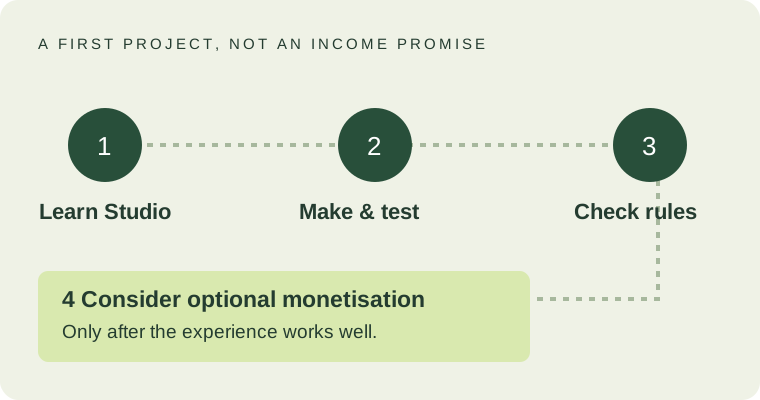
Learn the workspace.
Follow an introductory Studio lesson. Practise selecting, moving and resizing objects before building something large.
Build and test one small idea.
Give it a beginning and an ending. Play through it yourself, then watch a trusted tester try it without your instructions.
Check the publishing requirements.
Verify the account and audience requirements in the current official publishing documentation. Saving work and making it publicly available are not the same step.
Decide whether monetisation belongs.
Only consider a paid feature when you can explain its benefit and implement it properly. Leaving the project free is an option.
Publishing is not just pressing a button.
The current Roblox documentation sets different requirements by audience. Public or limited-audience publishing involves an eligible account, an age check and a content-maturity questionnaire. Reaching all ages adds further verification, security, subscription-or-fee and evaluation conditions. Private project work is a different case.[13]
Because requirements change, do not follow an old “anyone can instantly publish to everyone” tutorial. Read the current rules with a parent or guardian where appropriate, then check the options shown on your account.
Create an honest title and description. Use images and content you have permission to use. A borrowed character, music track or model is not automatically free to republish just because it is easy to download.
What creator earnings can involve.
Experience features. Passes can provide a one-time privilege; developer products can provide something a player buys repeatedly. Implementation matters: a paid feature should work as described, not merely display a purchase button.[3][4]
Avatar items. Marketplace publishing has requirements beyond designing the item. The reviewed policy calls for identity verification or a linked parent account, relevant security steps, fees or publishing advances, and a qualifying Plus or legacy Premium 1000/2200 membership to publish and keep items on sale. Check the detailed rules for your content type.[10]
Creator Rewards. Roblox’s programme rewards eligible engagement and audience expansion. It replaced older Engagement Based Payouts and Creator Affiliate programmes. Eligibility, genuine player activity and holding periods matter; simply leaving an experience open is not a promise of payment.[11]
If a tutorial advertises guaranteed daily earnings, compare every claim with the current programme rules. Do not buy traffic, encourage alternate accounts or manipulate engagement to chase rewards.[11]
A small project review you can actually use.
Ask a tester to describe the goal after the first minute. Watch where they get stuck. Make the route clearer before adding more decoration. Test on a smaller screen as well as your own.
Keep three notes: what the tester expected, what actually happened and the smallest change that could improve it. This turns “make it better” into concrete work.
Earning Robux is not the same as cashing out.
DevEx is a separate, reviewed programme for qualifying earned Robux. The official overview lists a minimum of 30,000 earned Robux, age 13 or older, a verified email address, a valid DevEx portal account and good standing, alongside its full terms. Meeting a numerical threshold alone does not guarantee approval or earnings.[14]
Purchased or transferred Robux are not a cash-out shortcut. Read the DevEx rules before making business plans; do not use this guide as tax or financial advice.[2][9]
Read it on Roblox.
These are the official pages used for this guide. Checked on 28 September 2026. Requirements can change.
- Core curriculum (opens in a new tab)
- Create and publish games and places (opens in a new tab)
- Passes (opens in a new tab)
- Developer products (opens in a new tab)
- Marketplace policy (opens in a new tab)
- Creator Rewards (opens in a new tab)
- Developer Exchange: overview and requirements (opens in a new tab)
- Roblox Terms of Use (opens in a new tab)
- Sending and Receiving Robux (opens in a new tab)