blocknote
Pause when the task stops making sense.
Roblox warns that Robux generators are scams. An outside promise of instant currency does not become legitimate because it has a progress bar, a familiar avatar or enthusiastic comments.[15]
A useful rule is to look at the action you are being asked to take, not the reward pictured above it. Giving someone account access is still giving them access when the page calls it “verification”.
Some things are never a reward claim.
Do not share passwords, browser cookies, two-step verification codes or backup codes. Roblox’s account-safety guidance also warns about deceptive forms, off-site downloads and browser extensions. Keep your recovery email under your own or your parent’s control.[16]
For Quick Login, only approve codes you requested for your own login. Someone else’s code can be an attempt to gain access to your account.[23]
Check the real destination.
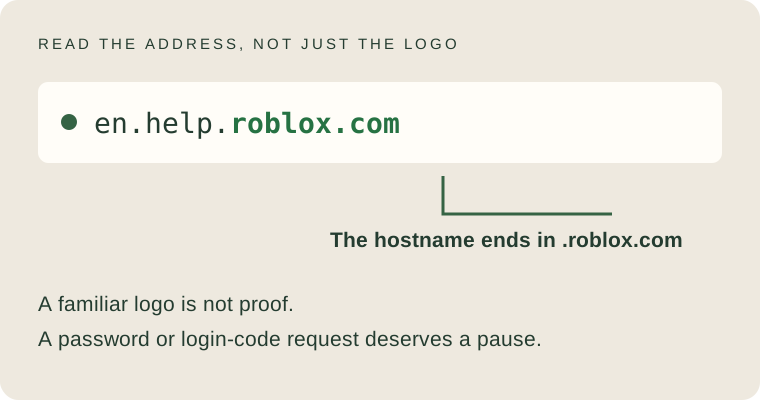
For the official Roblox sources in this guide, the hostname is roblox.com or a subdomain ending in .roblox.com. Read the address in your browser, not only the visible link text. A secure-connection symbol does not prove that a page belongs to Roblox.
For example, the word “roblox” in a path after a different website’s address would not make that website Roblox. When unsure, open the official site yourself rather than following a message’s shortcut.
Use the checked reference directory ↗Would you stop or continue?
Four small situations. Choose the response that protects the account, then read the explanation. A wrong answer here is simply something useful to learn.
Practice only. No prizes, no account connection and no stored answers.
Reference guidance for these fictional scenarios: [15][16][23][9]
Set up protection before you need it.
Use a unique password and enable an appropriate two-step verification method through Roblox’s own account settings. The official guide explains supported methods and the verified-email requirement. Store recovery information somewhere private, not in a shared chat.[17]
Tell a trusted adult if a message pressures you to keep a download, transfer or conversation secret. Getting help early is more important than feeling embarrassed.
Already clicked, downloaded or shared something?

Stop using the suspicious page.
Do not complete another “verification” step or pay a recovery fee. If you are younger, ask a trusted adult to help.
Secure the device first.
Roblox’s recovery guidance says to remove suspicious downloads or extensions and address malware before recovering the account.
Use the official recovery route.
Reset the password on Roblox, enable two-step verification and contact official support if access is lost. Avoid strangers claiming to be recovery agents.
Roblox does not guarantee restoration of lost items or currency. Its recovery article says to contact it within 30 days of compromise when seeking help with lost inventory. Act promptly and follow the official instructions.[18]
Read it on Roblox.
These are the official pages used for this guide. Checked on 28 September 2026. Requirements can change.